

Imagine a dashboard that thinks like your strategy and speaks your priorities. You choose outcome-focused KPIs, pair leading and lagging indicators to predict and confirm results, and automate trusted data with clear owners and definitions. You design for fast decisions with 1-3-10 second cues, uncluttered visuals, and drill-downs, then tailor views for executives, managers, and analysts. You avoid vanity metrics, enforce governance, and set review cadences—now, here’s how to build it step by step.
Key Takeaways
- Anchor KPIs to strategic outcomes; use SMART definitions and pair leading indicators with lagging results for prediction and validation.
- Limit to one-screen dashboards with prioritized KPI tiles, concise trend lines, and clear titles for rapid 1-3-10 second scanning.
- Group metrics by audience and function (executive, manager, analyst) with default views and documented calculations.
- Automate data capture with governed connectors, validation, and ownership; document sources, targets, and review cadence.
- Provide light interactivity: time filters, key segments, and drill-downs to underlying records without cluttering the canvas.
What Is a Performance Dashboard?
What exactly is a performance dashboard? It’s a visual tool you use to track progress toward your goals by centralizing essential metrics and indicators in one place, so you can spot changes quickly and act with confidence. You see KPI tiles, trend lines, and alerts that summarize performance at a glance, then drill down to uncover what’s driving results, enabling fast diagnosis without sifting through raw reports.
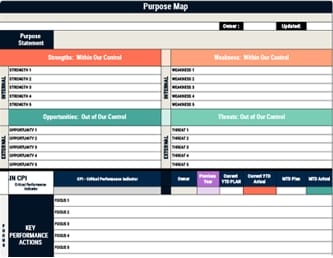
You benefit from real-time updates that support timely decisions, while the shared view promotes transparency and accountability across teams and stakeholders. When you build it with clear KPIs, intuitive visuals, and consistent refresh cycles, the dashboard guides daily actions and highlights inefficiencies for continuous improvement. Ultimately, it turns scattered data into a coherent, decision-ready picture. To ensure dashboards drive execution, connect KPIs to a few Critical Performance Indicators and embed daily Key Performance Actions so insights translate into on-the-ground behavior.
Align Metrics With Strategy and Outcomes
Even before you design charts, anchor your dashboard to strategy by selecting KPIs that directly reflect the outcomes you’re targeting, using SMART criteria so each metric is specific, measurable, actionable, realistic, and time-sensitive. Start by mapping objectives to questions you must answer, then pick the few metrics that resolve those questions without noise. Prioritize metrics that tie decisions to results, placing outcome KPIs at the top and supporting context beneath them in an inverted pyramid layout that moves from strategic highlights to diagnostic detail.
Organize related KPIs by function and align each group with its audience: executives see enterprise outcomes, managers get operational drivers, and analysts access deeper diagnostic views. Schedule periodic reviews, retire stale metrics, and adjust targets as strategies evolve so your dashboard remains tightly aligned with current priorities and outcomes. Add governance rhythms for regular progress tracking so dashboard reviews directly inform resource allocation and keep teams accountable to strategic objectives.
Choosing Actionable KPIs: Leading and Lagging
How do you choose KPIs that not only describe performance but also drive timely action? Start by pairing leading indicators that forecast outcomes with lagging indicators that validate results, so you can act early and confirm impact later. Use the SMART test—Specific, Measurable, Actionable, Realistic, Time-sensitive—to define each KPI, ensuring every metric links directly to a strategic goal and a clear decision you’ll make when thresholds are hit. To ensure KPIs reinforce strategy and execution, align them with organizational alignment principles so metrics support shared goals, clear communication, and agility across teams. Group KPIs by context, such as sales, marketing, and operations, to clarify what predicts performance versus what reports it. In sales, demo bookings or pipeline velocity lead, while revenue and win rate lag. Visualize leading KPIs prominently to signal momentum or risk before results appear, and use comparative lagging views to gauge progress across periods.
Ensuring Data Quality and Automated Capture
Strong KPIs only work when the underlying data is trustworthy, so you should automate how data enters your dashboard and verify its quality before you visualize anything. Build reliable data connections to each source system, then set automatic refresh intervals so metrics reflect the latest activity without manual exports. Use robust integration techniques—such as schema mapping, deduplication, and type validation—to keep fields consistent across tools and prevent silent errors. Enable cross-system connectors that support multiple programs and devices, ensuring seamless, end-to-end reporting. To sustain trustworthy metrics over time, incorporate regular feedback loops inspired by continuous communication practices to keep teams aligned on data definitions and quality standards across the organization. Prioritize accuracy with layered validation: run pre-load checks for missing or out-of-range values, apply business rules, and log anomalies for review. Schedule regular data quality checks and governance workflows, then document owners and thresholds. Add time-based filters and drill-downs to confirm context and trace anomalies quickly.
Designing Clear Visuals for Fast Insight
Why do some dashboards feel instantly understandable while others force you to hunt for meaning? Start by labeling every chart with clear, descriptive titles and axis names, using precise terms so users know exactly what they’re seeing without decoding jargon. Choose metrics with SMART discipline; when each metric is specific, measurable, actionable, realistic, and time‑sensitive, users can judge performance and decide next steps quickly. Group related metrics by theme to shorten scan time and reinforce consistent patterns, then keep the layout simple: one screen, limited views, and consistent graph sizes that reduce visual noise. Add light interactivity to support fast exploration—time selectors, key filters, and show/hide controls—so users can focus on the question at hand without leaving the context of the dashboard. Apply the 1‑3‑10 second rule to ensure visual cues reveal status at a glance, pinpoint problems quickly, and clarify next actions and owners without delay.
Structuring Dashboards by Audience and Use Case
Blueprints matter: structure each dashboard around who’ll use it and what decisions they need to make, aligning strategic KPIssfor executives with real-time, drill-down metrics for operational teams. Start by mapping roles to questions they must answer, then select actionable, SMART KPIs that directly support those decisions, avoiding vanity metrics that distract from outcomes. Group KPIs by function, such as revenue, pipeline, operations, and customer health, and standardize labels, timeframes, and units so users can scan quickly and compare consistently. Define default views per audience to keep focus tight, while documenting calculation logic to preserve trust. Assign a departmental dashboard lead to own data quality, governance, and iteration, ensuring metrics remain relevant as goals change and that stakeholders receive timely, decision-ready information. Well-structured dashboards strengthen organizational alignment by linking audience-specific KPIs to strategic objectives, improving engagement and accelerating performance.
Enabling Interactivity, Filters, and Drill-Downs
With audiences and use cases defined, make the dashboard work like a tool, not a poster, by enabling focused interaction that lets users answer their next question without leaving the page. Give users control over time intervals, allow zoom on charts, and let them hide or show elements to tailor views, so they can isolate patterns and remove noise quickly. Add filters that narrow data by segment, product, or region, which sharpens communication and saves time by presenting only what matters now. Integrating visual management principles like real-time indicators and clear signals improves responsiveness and transparency through Andon systems.
1) Use drop-down menus and hover pop-ups to surface definitions, notes, and related metrics without cluttering the canvas.
2) Offer drill-down paths from KPIs to underlying records, preserving context.
3) Enable self-service fields or uploads for lightweight analysis.
4) Support collaboration with cross-device sharing, comments, and annotations.
Governance: Owners, Targets, and Review Cadence
How do you keep a performance dashboard useful as priorities shift and teams grow? Start by assigning a clear owner in each department to ensure accountability, validate data accuracy, and triage all dashboard requests, so changes flow through a single responsible point. Pair that owner with a department-specific dashboard lead who aligns each view with current objectives, coordinates cross-team governance, and prevents metric sprawl.
Define SMART-aligned targets for every key metric, documenting definitions, data sources, and calculation rules, which stabilizes interpretation and supports actionable decisions. Set a formal review cadence—monthly for operational metrics, quarterly for strategic ones—to retire stale KPIs, adjust targets, and confirm alignment with evolving goals. Enforce governance for data quality, policy adherence, and scalable processes, so your dashboards remain trusted, consistent, and adaptable. Incorporate a regular checkpoint to confirm that metrics reflect a results-oriented focus and support continuous improvement, reinforcing operational excellence principles.
Common Pitfalls to Avoid and Practical Tips
Strong governance only pays off if you avoid common traps that undermine clarity and action, so build your dashboard habits around a few practical guardrails. Keep the screen simple and consistent, because information overload hides signal and slows decisions. Center every chart on a decision you can make today, not a vanity metric that looks impressive but changes nothing, and set clear ownership so questions route to the right person fast. Tie dashboard KPIs to measurable outcomes and performance metrics so strategy and execution stay aligned and impact can be tracked and adjusted.
- Limit scope: one screen, restrained views, and consistent graph sizes to preserve scanning speed.
- Prioritize action: define the decision each KPI enables, and remove metrics without a clear use.
- Assign owners: document names, responsibilities, and interpretation rules for accountability.
- Align by role: tailor executive, manager, and analyst views, then review quarterly to adjust metrics, targets, and layouts as objectives evolve.
Frequently Asked Questions
How Do We Estimate the Cost and ROI of Building Dashboards?
Estimate cost by listing labor hours for discovery, data engineering, visualization, QA, and training, then multiply by blended rates, adding software, infrastructure, and maintenance. Include data acquisition and governance overhead.
For ROI, quantify time saved, error reduction, faster decisions, and revenue lifts from improved targeting, then annualize benefits. Calculate payback, NPV, and IRR, and run sensitivity scenarios. Don’t forget adoption costs, change management, and ongoing enhancement cycles.
What Change Management Steps Drive User Adoption of Dashboards?
Prioritize executive sponsorship, define clear use cases with measurable outcomes, and involve users early through interviews and prototypes. Standardize data definitions, map workflows, and align metrics to roles so dashboards answer daily decisions.
Provide targeted training, quick-reference guides, and office hours, then launch in phases with champions who model use. Establish feedback loops, iterate based on adoption metrics, embed dashboards in existing tools, and set accountability through cadenced reviews and incentives.
How Should We Train Stakeholders to Interpret Metrics Consistently?
You start with gentle handshakes around definitions, then lock them in writing with a shared metric glossary and example scenarios. You teach direction, magnitude, and timeframe, so stakeholders read trends, not just numbers. You run calibration workshops using the same datasets, compare interpretations, and resolve gaps. You standardize thresholds, color rules, and caveats. You document “how to read” guides, embed tooltips, and assess comprehension with brief quizzes and periodic refresher sessions.
What Privacy and Compliance Considerations Apply to Dashboard Data?
You must protect personal and sensitive data, apply data minimization, and enforce role-based access, ensuring only authorized users see identifiable information. Anonymize or pseudonymize where possible, log access, and set retention limits. Comply with GDPR, CCPA/CPRA, HIPAA, or sector rules, documenting lawful bases, consent, and data subject rights. Use encryption in transit and at rest, implement DPIAs for high-risk processing, and establish incident response and vendor agreements with clear security obligations.
How Do We Sunset Outdated Dashboards Without Disrupting Teams?
You sunset outdated dashboards by planning like a meteor strike. First, inventory usage metrics, identify owners, and define replacement views with mapped metrics. Announce timelines early, provide side‑by‑side access, and set a clear freeze date. Migrate alerts and links, update training docs, and host short enablement sessions. Monitor adoption with usage thresholds, then decommission in phases, keeping a rollback window. Finally, archive snapshots and metadata for auditability, lineage, and change history.
Conclusion
You’ll build dashboards that work when you anchor KPIs to strategy, pair leading and lagging measures, and automate reliable data with clear owners and definitions. Present outcomes first, keep visuals clean, and design role-based views that surface 1–3–10 second cues with drill-downs for action. Treat governance, targets, and review cadence as routine maintenance. Avoid vanity metrics and clutter. Done well, your dashboard becomes an instrument panel, guiding confident, timely decisions in any conditions.