
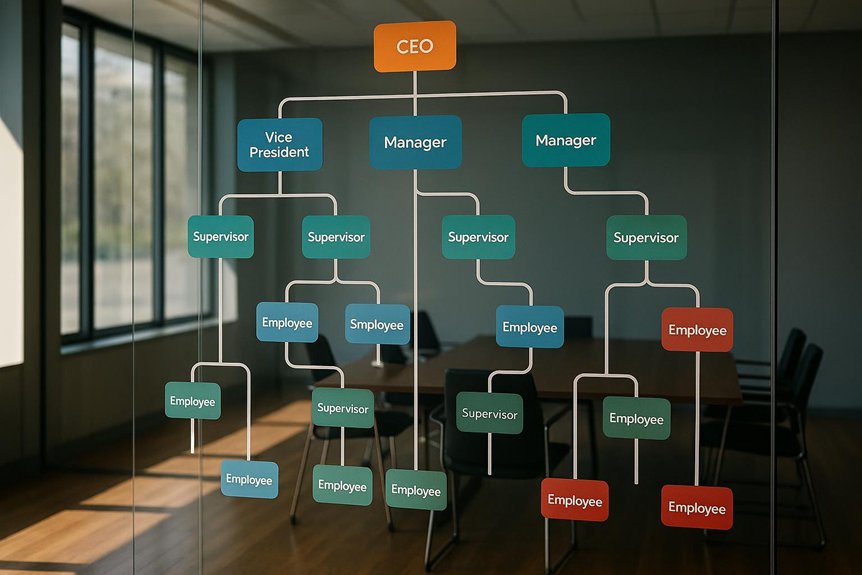
Nothing affects team clarity more than a well-built org chart that actually gets used, so you should define your chart’s goal and scope, pick an audience-appropriate template, and map roles, teams, and reporting lines with consistent shapes, colors, and labels. Use branding-friendly designs, clear legends, and drag‑and‑drop tools for quick edits, then set governance, version control, and HRIS integration to keep it accurate—because structure only helps if it stays trusted and current, which raises a crucial question…
Key Takeaways
- Define the chart’s purpose, scope, governance, and update cadence; assign an owner and integrate with HRIS for a single source of truth.
- Choose a template matching audience needs; standardize branding, line styles, and color-coding for clarity and consistency.
- Show clear reporting lines (solid) and influence (dotted); include essential details like names, titles, departments, contacts, and locations.
- Match structure to strategy: functional, divisional, matrix, flat, product, project, or geographic, noting trade-offs and governance implications.
- Use editable, embeddable tools (e.g., drag-and-drop) with version control; publish a shareable link and announce updates after org changes.
Define Your Org Chart’s Goal and Scope
Before you start drawing boxes and lines, clarify why you’re creating the org chart and who’ll use it, because those choices drive everything from detail level to structure. Decide whether the goal is onboarding, quick reporting references, or enabling cross-team collaboration, since each purpose demands different depth and labels. Establish scope early: will you map the whole company, a single department, or a project team, and will you include contractors or dotted-line roles. Identify key decision-makers and formal reporting paths, then mark dotted-line connections so influence and oversight are visible. Determine where the chart will live—internal, public, or presentation-only—and select a fitting overall structure such as hierarchical, matrix, or divisional. Finally, set measurable success criteria and a recurring review cadence to keep it accurate. To ensure the org chart supports broader business performance, align it with your strategic objectives and communication plans so roles, reporting lines, and updates reinforce company-wide goals.
Choose the Right Org Chart Template
How do you pick a template that fits your goal without wasting time on redesigns? Start by matching the template’s complexity to your audience’s needs, choosing simple name/designation layouts for quick overviews and richer hierarchical designs with photos for detailed briefings. Use platforms like Canva to apply branding fast, since color and font controls keep every chart consistent across teams and updates. Favor drag-and-drop editors, which let you adjust roles, add notes, and embed charts into presentations without rebuilding slides. Well-aligned org charts support broader strategic cohesion by reflecting structures used in frameworks like McKinsey 7-S, ensuring roles, processes, and values stay in sync.
- Pick a layout aligned to your goal and audience depth.
- Choose templates with brand-ready colors, fonts, and logo slots.
- Ensure drag-and-drop editing for fast, real-time revisions.
- Verify easy embedding into decks and reports.
- Standardize with ready-to-use variants for projects, committees, onboarding, and workflows.
Compare Org Chart Structures (Functional, Divisional, Matrix, Flat)
Curious which org chart fits your team’s goals and constraints? Start by weighing how work flows and where decisions need to happen. A functional structure groups roles like Marketing and Finance under specialized leaders, giving clear authority and deep expertise, but it can create silos and slow cross-functional decisions.
A divisional structure organizes by product, market, or region, making each unit a mini-business with focused accountability, yet it risks duplicate resources and higher costs.
A matrix structure combines functional and project reporting, boosting collaboration and flexibility, though dual bosses can trigger conflicting priorities and confusion.
A flat structure compresses layers to speed communication and empower teams, but wider spans of control may cause role ambiguity, overload, and uneven decision quality.
To keep any chosen structure effective over time, establish a Business Operating System that documents roles, processes, and metrics, and refine it through regular reviews.
Use Project, Product, or Geographic Org Chart Models
Why choose a project, product, or geographic model? You use these org charts when initiatives, offerings, or regions drive how work gets done, because each model clarifies accountability, accelerates decisions, and aligns resources where impact is highest. In a project-based chart, you form time-bound circles that house technical staff and management, enabling rapid adaptation as priorities shift; plan for transitions as projects start, evolve, or end. In a product-based chart, you group teams by product lines or customer segments, aligning marketing, sales, and delivery inside each division to sharpen market focus and execution. In a geographic chart, you separate circles by regions, supporting localization, logistics, and operational efficiency across territories. Embed simple visual cues that follow the 1-3-10 rule so teams can instantly see status, spot issues in seconds, and know who owns next actions.
Adopt Modern Org Chart Models: Holarchy, Sociocracy, Circles
Already seeing the limits of boxes and hierarchies, you can shift to modern org chart models—holarchy and sociocracy—that map work as Circles and Roles, distributing authority and clarifying accountability without stacking more layers of management. In holarchy, you depict interconnected Circles that own domains and execute through Roles, letting people hold multiple Roles across Circles, which flattens structure and reduces traditional middle management. Sociocracy adds consent-based decisions inside each Circle, while Double-Link governance connects adjacent or higher Circles, ensuring information flows both ways and accountability remains explicit. Use templates, like Talkspirit’s Holarchy, Project-Based, Product-Based, and Geographic Divisional models, to visualize autonomous Circles and cross-functional Roles. This approach increases agility by aligning resources dynamically across projects and regions, while keeping responsibilities transparent and adaptable. Additionally, incorporating visual management tools provides real-time feedback and clear indicators that enhance transparency, collaboration, and continuous improvement within these Circle-based structures.
Map Roles, Teams, and Reporting Lines Clearly
Modern models like holarchy and sociocracy still depend on clear visuals, so map roles, teams, and reporting lines in a way that anyone can read at a glance and verify against how work actually gets done. Show who reports to whom and how departments connect using simple boxes for positions and solid lines for formal authority, then add dotted lines where secondary guidance or influence exists. Use consistent shapes, sizes, and spacing to signal role type and depth, and color-code divisions so readers can follow cross-team links quickly. Include optional photos, contact details, or icons to speed onboarding and collaboration. Balance readability and completeness by limiting levels, using scalable templates, and scheduling reviews to keep charts accurate as responsibilities shift. Add clear, color-coded indicators inspired by visual management boards—such as green for normal operations and red for issues—to help teams quickly spot deviations and drive action through real-time visualization.
- Use boxes for roles
- Solid and dotted lines
- Color-coded divisions
- Photos and contact details
- Scheduled review cycles
Build Your Org Chart: Tools and Setup Steps
How should you get from a blank page to a clear, shareable org chart? Start by choosing a tool that speeds setup without sacrificing clarity, then open a template that fits your structure and audience. In Canva, you’ll find thousands of free templates, from simple name-and-title grids to deep hierarchies with photos, color palettes, and brand fonts. To keep execution aligned, add measurable roles or KPIs to each box so your chart supports Visual Management Boards for transparency and accountability. Import your role list, then place leaders and teams using Canva’s drag-and-drop interface, which lets you align boxes, add connector lines, and rearrange levels in minutes. Customize colors and typography to match your brand, ensuring visual consistency across project flow charts, school committees, startup teams, or large-company structures. When the layout reads correctly, embed the chart in a presentation or publish and share directly from Canva for seamless collaboration and distribution.
Keep Your Org Chart Up to Date
Why let your org chart drift out of date when a simple process keeps it reliable and useful? Treat updates as routine maintenance, not a special project, and you’ll avoid confusion about who does what and how to reach them. Set a review cadence—quarterly works for most teams—and schedule an immediate check after any restructure, merger, or leadership change. Assign a clear owner, such as HR ops or a PM, to certify accuracy and coordinate input from managers. To strengthen clarity and ownership, align updates with governance rhythms so progress is tracked and responsibilities remain visible.
Treat org chart updates as routine maintenance to keep roles clear, contacts current, and accountability strong.
- Document triggers: promotions, new hires, departures, and title changes
- Use version control to record edits and enable quick rollbacks
- Integrate with HRIS and payroll to sync names, roles, and contacts
- Publish a single, shareable link to the current chart
- Announce updates to stakeholders and request confirmations
Best Practices and Common Org Chart Mistakes to Avoid
Keeping your chart current is only half the job; you also need to build it with clear standards that prevent confusion and make scale manageable. Right-size the layout by splitting very large structures into linked charts that still anchor to the top level, so readers grasp the whole without getting lost. Use consistent shapes, colors, and labels—one shape for supervisors, one color per division, and a simple legend—to eliminate guesswork. Show reporting relationships precisely with vertical alignment and lines that distinguish formal authority from dotted-line influence. Include essential details—names, titles, departments, contact info, and location—yet avoid clutter by omitting nonessential notes. Establish a formal review cadence with internal and external reviewers, documenting changes, to preserve accuracy and trust over time. Integrate org charts with strategic alignment tools and frameworks to reinforce vertical and horizontal alignment, improving collaboration, decision-making, and business performance.
Frequently Asked Questions
How Do Org Charts Influence Compensation and Career Progression Frameworks?
They shape pay bands and promotion paths by defining roles, levels, and reporting lines, so you benchmark compensation consistently and set clear advancement criteria. You map skills and scope to each level, align titles with market data, and prevent pay compression across adjacent tiers. You also identify managerial versus specialist tracks, document competencies for progression, and use spans of control to calibrate salary ranges, ensuring transparent reviews, equitable raises, and predictable career movement.
What Privacy Rules Apply When Publishing Internal Org Charts?
You must follow data protection laws like GDPR, CCPA, or HIPAA where applicable, and your own confidentiality policies. Publish only necessary information—names, roles, departments—while excluding sensitive data such as salaries, personal contacts, or IDs. Limit access based on need-to-know, apply role-based permissions, and log access. Obtain consent where required, honor opt-outs, and provide notice of purpose and retention. Encrypt stored charts, secure sharing links, and regularly review for accuracy and least-privilege compliance.
How Can Org Charts Integrate With Onboarding and Role Handover Processes?
Picture a relay baton: you use the org chart to guide onboarding and handover by mapping roles to responsibilities, systems, and key relationships. Link each node to playbooks, SOPs, org-specific glossaries, and access checklists, then embed probation milestones and training paths. For handovers, attach transition timelines, risk registers, and current project owners. Integrate with HRIS and ticketing, enable version history, and require manager sign‑off to keep ownership, permissions, and context accurate.
How Do Mergers or Acquisitions Impact Org Chart Transition Planning?
They force you to align structures, resolve role overlaps, and redefine reporting lines, so you must plan sequencing, communication, and governance carefully.
Start with a side‑by‑side org comparison, map critical functions, and identify redundancies.
Create interim reporting for day one, then phase to the target model.
Assign change owners, set decision rights, and maintain a single source of truth.
Communicate role impacts early, update titles and spans, and integrate systems and permissions promptly.
What Metrics Evaluate the Effectiveness of an Org Chart Over Time?
You evaluate effectiveness with metrics that reveal clarity, speed, and outcomes. Track decision latency, span of control, manager-to-staff ratios, and handoff counts to gauge complexity. Monitor time-to-hire, onboarding time, and internal mobility to assess talent flow. Measure cross-functional cycle times, escalation rates, and rework to detect coordination issues. Tie structure to results by reviewing OKR attainment, cost per outcome, employee engagement, regrettable attrition, customer satisfaction, and audit or compliance findings.
Conclusion
You’re ready to build an org chart that’s clear, current, and useful. Define scope, pick the right template, and show reporting lines consistently, then integrate with HRIS for automatic updates and embed charts where teams work. Schedule version control and quarterly reviews to keep accuracy high. Interestingly, companies with strong org clarity are 1.5x more likely to outperform peers, so document governance, color-code divisions, and use drag‑and‑drop tools to speed changes while distinguishing authority from influence.